An LLM agent may have access to a calculator, a browser, a code runner, GitHub, Slack, Jira, Google Drive, a database, and hundreds of internal APIs.
Giving the agent more capabilities sounds useful. But there is a practical problem: every tool normally comes with a name, description, and input schema. If I place all of those definitions in every model request, the model has to read a large API catalog before it can answer a simple question.
That costs tokens. More importantly, it makes tool selection harder.
Deferred tools solve this by separating two decisions:
- What capability does the agent need?
- How exactly should the agent call it?
The model first searches a compact tool catalog. The system then reveals the full schema for only the relevant tools. In other words, the agent discovers capabilities on demand instead of carrying every possible capability in its prompt.
I briefly introduced this idea while explaining ToolSearch in Claude Code Tools Explained. Here, I want to go deeper into deferred tools as a general agent architecture pattern.
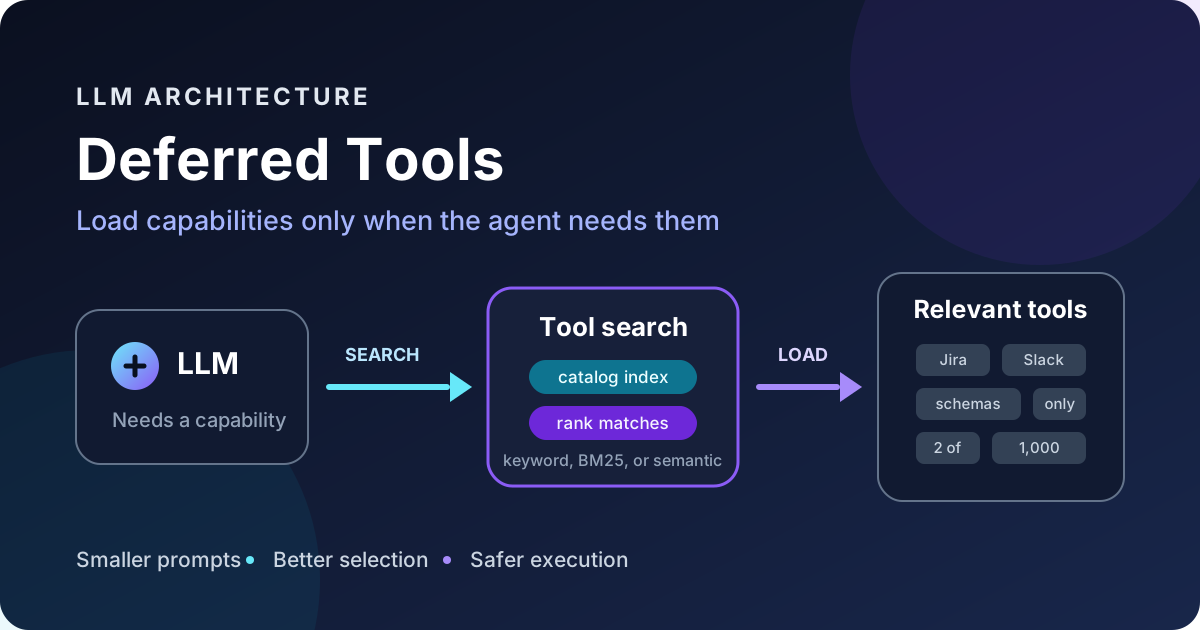
In this post, I will explain why this pattern exists, how the control loop works, the main ways to implement it, and the failure modes I would watch in production.
First, What Is an LLM Tool?
A tool is a typed interface between a model and some executable capability.
A weather tool might look like this:
{
  "name": "weather_get_forecast",
  "description": "Get the weather forecast for a location",
  "input_schema": {
    "type": "object",
    "properties": {
      "location": { "type": "string" },
      "days": { "type": "integer", "minimum": 1, "maximum": 10 }
    },
    "required": ["location"]
  }
}
The model does not execute this function by itself. It emits a structured request containing the tool name and arguments. The application or model provider executes the operation and returns its result to the conversation. This is the basic tool-use contract described by Anthropic, and the same general loop appears across modern function-calling APIs.
The schema matters because it tells the model:
- what the tool does
- when it is appropriate
- which arguments exist
- which values are required
- which constraints the arguments must satisfy
With five small tools, sending every schema is usually fine. With 500 tools from multiple services, it becomes architectural baggage.
The Problem With Eager Tool Loading
The conventional approach is eager loading:
System instructions
+ tool 1 schema
+ tool 2 schema
+ tool 3 schema
+ ...
+ tool 500 schema
+ user request
This creates four problems.
1. Tool Definitions Consume Context
Tool definitions are part of the input seen by the model. A detailed schema can easily take hundreds of tokens. Multiply that by hundreds of tools and the catalog begins competing with conversation history, retrieved documents, and the user’s actual request.
The important cost is not only the context-window limit. Input tokens also affect latency, price, and how much useful information the model must sift through.
2. Selection Gets Harder
More choices do not automatically produce better decisions.
If the model sees search, search_files, search_messages, search_issues, search_records, and 40 other vaguely described operations, it can choose the wrong one even though the correct tool is technically available.
This is an information-retrieval problem disguised as function calling.
3. Large Tool Lists Make Prompts Unstable
Connected services change. Permissions change. Tools are added, removed, and renamed.
If the entire catalog sits in the system-prompt prefix, any change can alter that large prefix and reduce the value of prompt caching. Some provider-native deferred-loading systems specifically exclude deferred definitions from the cached prefix for this reason.
4. Most Tools Are Irrelevant to Most Requests
An agent writing a SQL query does not need the schema for creating a calendar event. An agent summarizing a document does not need 80 CRM actions.
Loading everything “just in case” is the tool equivalent of importing an entire monolith to call one function.
What Deferred Tools Change
With deferred tools, the model initially receives only:
- a few common tools that are useful in most turns
- a tool-search capability
- enough guidance to know which categories of tools exist
The specialized definitions remain outside the model’s initial context.
The loop then looks like this:
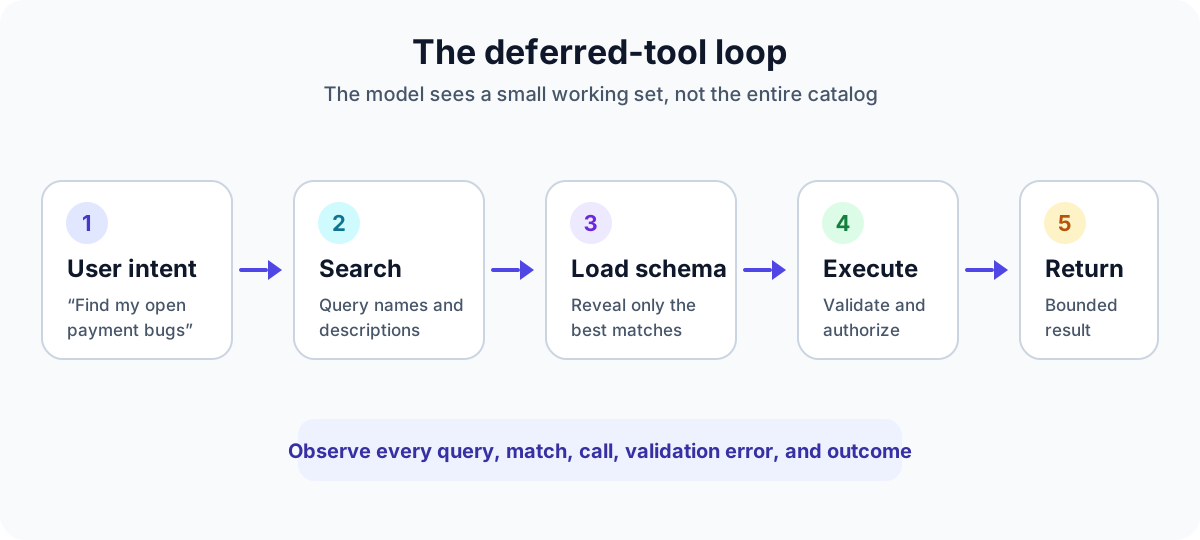
For a request such as:
Find the open payment bugs assigned to me and post a summary in Slack.
the agent may proceed like this:
- Search for “list issue tracker bugs assigned to current user.”
- Receive the schema for
jira_search_issues. - Call it and inspect the results.
- Search for “send message to Slack channel.”
- Receive the schema for
slack_post_message. - Call it after any required confirmation.
- Return a final summary.
The complete catalog may contain 2,000 tools, but the model only reasons over the small working set needed for this task.
Two Ways to Implement Deferred Tools
I see two useful implementation patterns. They solve the same scaling problem, but the orchestration boundary is different.
Pattern 1: Provider-Managed Schema Hydration
In this design, the application still sends the provider all tool definitions, but marks most of them as deferred. The provider keeps those definitions out of the model’s initial context.
When the model searches for a tool, the provider returns references to matching tools and expands their full definitions into the conversation.
Anthropic’s current tool search documentation is a concrete example. It supports regex and BM25 search, uses defer_loading: true on deferred tools, and expands discovered tool references inline without changing the cached prompt prefix.
Conceptually:
{
  "tools": [
    { "type": "tool_search_tool_bm25", "name": "tool_search" },
    {
      "name": "jira_search_issues",
      "description": "Search Jira issues using filters",
      "input_schema": { "type": "object", "properties": {} },
      "defer_loading": true
    }
  ]
}
This pattern is convenient because the provider handles search-result blocks and schema hydration. The application still has to execute client-side tools and enforce authorization.
Pattern 2: Application-Managed Indirection
In this design, the model always sees two stable meta-tools:
find_tools(query)
run_tool(namespace, name, input)
The application owns the catalog, retrieval, schema validation, credentials, and execution.
find_tools returns a small list of definitions:
{
  "tools": [
    {
      "namespace": "jira",
      "name": "search_issues",
      "description": "Search Jira issues using JQL",
      "input_schema": {
        "type": "object",
        "properties": {
          "jql": { "type": "string" }
        },
        "required": ["jql"]
      }
    }
  ]
}
The model then calls:
{
  "namespace": "jira",
  "name": "search_issues",
  "input": {
    "jql": "assignee = currentUser() AND statusCategory != Done"
  }
}
I like explicit namespaces because names such as search, create, and list are common across services. A namespace makes ownership and dispatch unambiguous:
jira.search_issues
slack.search_messages
drive.search_files
The tradeoff is that the underlying tool may never become a first-class callable schema in the provider’s tool list. The model calls the generic run_tool interface instead, so the application must validate the nested input rigorously.
Deferred Tools and MCP Are Related, but Not Identical
The Model Context Protocol gives clients a standard way to discover and invoke server tools. In the MCP tools specification, a client can list tools with tools/list and execute one with tools/call.
That is discovery at the protocol level, but it is not automatically relevance search.
If five MCP servers collectively expose 800 tools, a client can still end up listing and injecting all 800 schemas into the model prompt. To get true deferred loading, the host or gateway needs another layer that:
- indexes the available tool metadata
- searches it using the user’s intent
- returns only a small relevant set
- refreshes the index when a server’s tool list changes
So I think of MCP as the transport and capability contract. Deferred tool search is the context-management and retrieval strategy built on top of it.
How Tool Search Actually Works
A deferred-tool catalog usually indexes some combination of:
- tool name
- tool description
- argument names
- argument descriptions
- service or namespace
- examples and tags
There are three common retrieval approaches.
Regex or Keyword Matching
This is predictable and easy to debug. It works well when tool names are consistent and the model can generate a good search pattern.
It is less forgiving when users and tool authors use different vocabulary. A tool named create_calendar_entry may not match a query about “booking a meeting” unless its description contains those concepts.
BM25
BM25 is a strong lexical-ranking baseline. It rewards meaningful term overlap while accounting for term frequency and document length.
It is fast, local, inexpensive, and explainable. For tool catalogs, those properties are valuable. A tool definition is short, and exact domain words such as “invoice,” “issue,” or “calendar” often carry a lot of signal.
Normalization must be symmetric. If I remove stop words or split identifiers while indexing, I need to apply the same transformation to the query. Otherwise, a seemingly harmless preprocessing difference can make relevant tools disappear.
Embedding or Hybrid Search
Embedding search can connect phrases such as “book a meeting” and “create calendar event” even when they share few words. Hybrid search combines that semantic signal with lexical matching.
This improves recall, but it adds an embedding model, a vector index, versioning concerns, and more difficult debugging. For a few hundred clearly named tools, I would begin with well-tuned lexical retrieval and measure misses before adding this complexity.
A Minimal Application-Managed Design
Here is the shape of a small deferred-tool source in TypeScript:
type DeferredTool = {
  namespace: string;
  name: string;
  description: string;
  inputSchema: Record<string, unknown>;
};

interface DeferredToolSource {
  namespace: string;
  search(query: string, context: ToolContext): Promise<DeferredTool[]>;
  execute(
    name: string,
    input: unknown,
    context: ToolContext,
  ): Promise<ToolResult>;
}
The dispatcher remains deliberately boring:
async function runDeferredTool(
  namespace: string,
  name: string,
  input: unknown,
  context: ToolContext,
): Promise<ToolResult> {
  const source = sources.get(namespace);

  if (!source) {
    return { isError: true, error: `Unknown namespace: ${namespace}` };
  }

  const definition = await source.getDefinition(name, context);
  validate(input, definition.inputSchema);
  authorize(context.user, namespace, name, input);

  return source.execute(name, input, context);
}
The key idea is ownership. Each source should own:
- how its tools are discovered
- how its credentials are resolved
- how inputs are validated
- how calls are authorized
- how errors and results are normalized
The central router should not contain service-specific business logic.
Which Tools Should Stay Eager?
Deferred loading should not become a rule that every tool must follow.
I would keep a small tool eager when it is:
- used in a large percentage of turns
- required to recover from failures
- needed to inspect local context before any specialized action
- so small that searching for it costs more than loading it
Typical eager tools might include file reading, basic search, a calculator, or the tool-search mechanism itself.
The exact split should come from telemetry. Anthropic’s current guidance suggests keeping the three to five most frequently used tools non-deferred and considering tool search when the catalog reaches roughly ten tools or the definitions exceed about 10,000 tokens. I would treat those as useful starting points, not universal laws.
Production Failure Modes
Deferred tools reduce prompt size, but they introduce a retrieval system into the agent loop. That system needs the same engineering discipline as any other search and execution layer.
Retrieval Misses
The right tool exists, but the search query or catalog description does not retrieve it.
Measure this with a test set of real user requests and expected tools. Track recall at the result limit, not only whether the desired tool ranks first.
Near-Duplicate Tools
The search returns several tools that sound interchangeable. The model chooses the wrong one or spends extra turns comparing them.
Descriptions should explain boundaries, not repeat names. “Search messages” is weak. “Search historical Slack messages; do not use for files or channel metadata” is more useful.
Stale Schemas
The catalog says an argument is optional, but the live API now requires it. This creates runtime failures that look like model mistakes.
Version the catalog, rebuild indexes on schema changes, and validate again immediately before execution.
Authorization Gaps
Discoverability is not permission.
A tool can appear in search results without the current user being allowed to run it. Authorization must happen at execution time with the current identity and requested arguments. Never assume that hiding a tool from search is a security boundary.
Prompt Injection Through Tool Metadata
Tool descriptions, remote MCP metadata, and tool results are inputs to the model. Treat metadata from untrusted servers as untrusted content. The MCP specification makes the same point about tool annotations.
Keep system policy separate from catalog text, allowlist trusted sources, and require confirmation for consequential actions.
Excessive Search Loops
The agent repeatedly searches with small variations instead of making progress.
Set limits for searches and tool calls, expose useful “no result” guidance, and log the query, returned ranks, chosen tool, validation outcome, latency, and final status.
Giant Tool Results
Loading schemas lazily does not help if a tool returns a 5 MB JSON object directly into the conversation.
Paginate, summarize, or store large outputs externally and return a handle. Context control applies to results as much as it applies to definitions.
How I Would Evaluate the System
I would build an offline evaluation set from actual tasks and record:
| Metric | What it tells me |
|---|---|
| Recall@k | Whether search surfaced the tool the task required |
| Selection accuracy | Whether the model chose the correct retrieved tool |
| Argument validity | Whether calls passed schema validation |
| Task success | Whether the complete user goal was achieved |
| Search turns per task | How much discovery overhead the design added |
| Tool-definition tokens | How much context eager loading would have consumed |
| End-to-end latency | Whether token savings outweighed the extra search round |
I would also preserve the negative examples. A query that retrieved the wrong tool is often more useful than another successful example because it exposes weak naming, missing synonyms, or confusing product boundaries.
The Real Mental Model
Deferred tools are sometimes described as lazy loading for function schemas. That is accurate, but incomplete.
The deeper pattern is progressive disclosure for agent capabilities:
large capability universe
        ↓
intent-based retrieval
        ↓
small working toolset
        ↓
validated execution
        ↓
bounded result
This is similar to how people work. I do not keep the full documentation for every API in my head. I first decide which system is relevant, then open the specific reference I need, perform the action, and keep only the useful result.
Deferred tools give an LLM agent the same kind of layered access.
Final Thoughts
More tools do not automatically make an agent more capable. Past a certain point, they make the prompt larger and the decision surface noisier.
Deferred tools let the system keep a broad capability catalog without forcing the model to inspect that entire catalog on every turn. The strongest implementations combine:
- a tiny eager toolset
- high-recall tool retrieval
- clear namespaces and descriptions
- schema validation at execution time
- current-user authorization
- bounded results
- end-to-end observability
The extra search step is real, so this pattern is unnecessary for a small, stable tool list. But once an agent connects to several apps or MCP servers, deferred discovery becomes more than a token optimization. It becomes the layer that keeps capability selection understandable, testable, and safe.